Search notes (client, candidate, researcher, admin)

The new Candidate note system that was added is a great feature to have and we will use it to the max, however it could use some improvements.
1. It does not identify the client name in it, it just has search ID, applicant name and search name. Would be nice to have the client name in it.
2. The email subject says CLIENT NOTE....maybe change that to something more relatable to the applicant like- (Client Name) background notice.
3. See below:
What problem are you trying to solve?
With many notes in the search section it would be great if this was color coded. That way if you see black you know its an admin note, if you see red its a client note posted by ta client. if you see candidate notes maybe green or something of that sort? Maybe make client notes that are sent from the client BOLD too help notice them better?
How does this process work today?
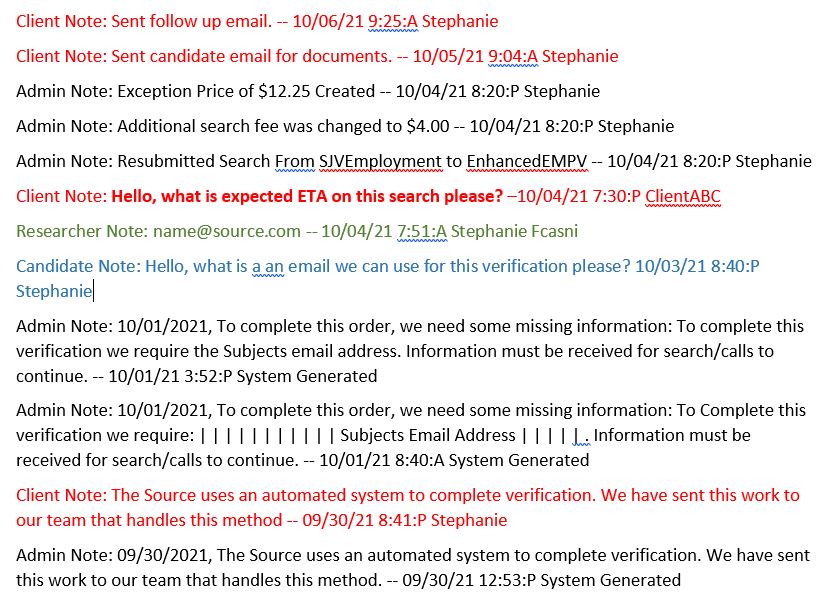
Now that candidate notes have been added there can be a large mix of notes listed under the search. Making it very hard to distinguish what note is from who. You literally need to read line by line to make sure you do not miss anything in the notes. like an admin note, researcher note, client note or candidate note. See attached sample please.
Example:
-

Thank You for this feedback Pierre Rhodes!
I completely understand how adding the Client Name into the applicant notes would be helpful. Also, from your screenshot I can definitely see how it would be hard to distinguish what note is from who when there are a large amount of notes present.
Please sign in to leave a comment.
Comments
1 comment